


OJEE Admit Card 2026 will be released on April 25, with exams scheduled from May 4 to 9. Candidates can retrieve their login details using the recovery options available on the candidate login portal.
 OJEE Admit Card 2026 to be Released on April 25: Steps to Retrieve Application Number, Password
Claude Live Session by Experts
Practical · No theory · See it work live
Saturday, 6 June
11 AM – 1 PM
2 HOURS
OJEE Admit Card 2026: The OJEE Admit Card 2026 shall be released by the Odisha Joint Entrance Examination Committee on April 25, 2026 , for the aspirants who will appear in the forthcoming entrance examination. Candidates who have successfully registered for the exam will be able to download their admit cards from the official website by logging in using their login credentials. An admit card is mandatory for entering the examination hall, and information related to the candidates' information, examination date, shift timings, center of examination, and other important information shall be mentioned on the same. It is suggested that the candidates should check their details upon receiving the admit card.
The OJEE examination 2026 will take place from May 4 to May 9, 2026, through Computer-Based Test (CBT). The test is carried out for admission into different undergraduate as well as post-graduate courses, such as B.Pharm, MBA, MCA, M.Tech, among others, in Odisha.
How to Download OJEE Hall Ticket for 2026?
The following steps can be followed to get access to the hall ticket:
Step 1: Visit the official website of OJEE.
Step 2: Choose the 'Download Admit Card – OJEE 2026' option.
Step 3: Provide the Application number and password.
Step 4: Submit the information and download the admit card.
Steps to Retrieve OJEE Application Number 2026
Those who may have forgotten their application number should take the following steps:
- Go to the official website for OJEE, Candidate Activity Board.
- Tap on Candidate Registration for OJEE 2026.
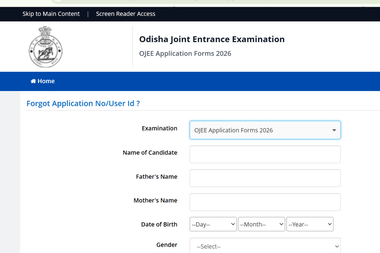
- Click on "Forgot Application No/User ID".
- Choose exam: OJEE Application Forms 2026.
-
Enter information:
- Name of candidate
- Father’s Name
- Mother’s Name
- Date of birth
- Gender
- Enter the PIN security number shown on the screen.
- Click on "Submit" to receive the application number.
Steps to Reset OJEE Password 2026
In case any candidate loses his/her password, he/she can change it through the following methods:
- Visit the ‘Forgot Password’ option on the login page.
- Select any of the given password recovery methods:
- One-Time Password sent to the registered mobile number
- Password reset link sent to the registered email address
- Provide the requested information and code.
- Change your password according to the provided guidelines.
The Aspirants are recommended to download their admit card well before the exam date in order to avoid any inconvenience at the last minute. The details provided must be correct, and if any error found, they should be reported immediately.
Keep visiting CollegeDekho for the latest Education News on entrance exams, board exams and admissions. You can also write to us at our email ID news@collegedekho.com.


