


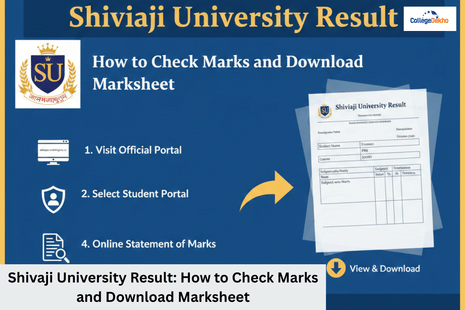
The Shivaji University result 2026 has been announced on the official website. Whether you are enrolled in undergraduate or postgraduate courses, you can download your Shivaji University results using your PRN number. You must click on the student portal on the official website and then login and click on the “Online statement of marks” link to download the results based on your course. The online marksheet is just a provisional document that students can view on the official webpage. You must visit your college and collect the hard copy from the office for future reference. So, in this article, navigate the official links, understand PNR requirements and more regarding Shivaji University results.
How to Check Shivaji University Result 2026 Online?
You can navigate the official webpage and check the Shivaji University Result 2026 online at the Shivaji student portal. Find the steps to check Shivaji University Result 2026 online.
- Step 1: Visit the official website of Shivaji and then navigate to the student portal.
- Step 2: You must select your exam from the list of recently declared results.
- Step 3: Enter your 10-digit permanent registration number.
- Step 4: Hit the “Search” or “Submit” button, and your subject-wise marks, credits, and final grades will appear on screen.
Pro Tip:
If you have forgotten your PNR number, then you must check your hall ticket and your college ID card, as it is the most vital piece of information for your login.
Also Read:
Top 10 MBA Colleges in Bangalore 2026: Fees, Placements & ROI Compared
Shivaji University Result 2026 Direct Links
To save your time, we have tabulated the direct links for your reference to download the Shivaji University result 2026.
Portal Type | Purpose | Direct URL |
|---|---|---|
Shivaji University Site | Notifications & Timetables | |
Student Portal | Result checking & Marksheets | |
Ph.D./Entrance Portal | Entrance Exam Results | sukapps.unishivaji.ac.in/pgbutr |
How to Download Your Shivaji University Marksheet 2026?
The Shivaji University result that you will see on the portal is just an online statement of marks, but not your final degree. You must collect the hard copy of your results from the distribution office at Shivaji College. So, once your result is displayed, you must click on the “Download PDF” icon at the top of the page. You can download the PDF for future reference.
What to Check on Your Online Marksheet?
Since the online result serves as a provisional marksheet for immediate admissions, ensure the following details are 100% accurate.
- Make sure your name spelling matches your 10th & 12th marksheets or government IDs.
- Check if the marks are assigned for the subjects you appeared for in the exam.
- Check if your result is marked “pass”, “fail” or “ATKT” indicators.
- You must verify your calculation of SGPA/ CGPA and report in case of any discrepancy.
What to do if Shivaji Result 2026 is Withheld?
Sometimes, instead of marks, you will see “held” or “reserved” status in your marksheet. This usually happens for the following reasons.
- Pending Eligibility, as your previous documents haven’t been verified.
- Fee issues as your exam fees or tuition fees is pending or unpaid.
- Internal Marks where your college has not uploaded your internal or practical marks yet.
In such cases, contact your college at the university's helpdesk at 0231-2609000 to resolve these issues.
Revaluation Process for Shivaji University 2026 Result
If you are not happy with your scores, you can apply for revaluation of your marksheet within 15 days of the result declaration. Below are the steps you can follow to apply for re-evaluation of your results.
- Step 1: Login into the student portal using your PNR number.
- Step 2: Select the “Revaluation Form” option.
- Step 3: Pay the prescribed online fees for re-evaluation, which are different for each subject.
- Step 4: Click on the “Submit” tab.
- Step 5: You must download the receipt for future reference, as the re-evaluation process will take 30 to 45 days.
So, your digital marksheet is just a gateway to your next semester or career milestone. While the Shivaji University online portal offers instant gratification, always priortise official hard copy issued by the University Examination Bhavan. In case of any persistent login errors or reserved results, you can connect to the college authorities. Therefore, in case you are still confused regarding Shivaji University result 2026, then drop us your query on the CollegeDekho Q&A Zone or contact us on our toll-free helpline number 18005729877.
FAQs
In the case of Shivaji University result 2026, after the re-evaluation process, the scores will be reflected within 30 to 45 days from the date of application. You can track the results on the “Online Results” tab, and a revised marksheet will replace the old one in case ofa marks change.
Yes, most institutions accept online statements of marks for PG admissions at Shivaji University provisionally. However, you must get it attested by your college principal or gazetted officer to prove authenticity until the original hard copy is issued.
On the Shivaji Result 2026 portal, check if you haven’t entered any spaces. If you still see the invalid message, then check if the portal is correct or not. If the issue is still not resolved, then connect to the college authorities, as there may be chances that your eligibility might still be under process.















Similar Articles
CBSE Class 12 Physics Answer Key 2026 (OUT) - All Sets Solved Question Paper PDF Download, Exam Analysis
ICSE Class 10 English Paper 2 Answer Key 2026 (Out) - Solved Key by Subject Experts, Question Paper PDF, Exam Analysis
Maharashtra SSC Hindi Answer Key 2026 - Solved Key by Subject Experts, Question Paper PDF, Exam Analysis
Final Days Prep for CBSE 10th English Exam Feb 21: Final Revision Tips and Practice Questions
How to Download CTET February 2026 Certificate and Marksheet on Digilocker?
CBSE Class 12 Physical Education Answer Key 2026 (OUT) - Solved Key by Subject Experts, Question Paper PDF, Exam Analysis