



- Steps to Download CTET 2026 Certificate and Marksheet on Digilocker
- Direct Link to Download CTET 2026 Certificate and Marksheet
- CTET Marksheet & Certificate on DigiLocker: Important Points
- What to Do if There is a DigiLocker Login Issue?
- Details Mentioned in the CTET Certificate and Marksheet 2026
- CTET 2026 Certificate Validity
- Faqs

If you are not sure how to download your CTET 2026 certificate and marksheet from DigiLocker, here is what you need to do. First, download the DigiLocker app on your Android or iOS phone and either Sign Up or Log In. You can use your registered mobile number to log in and access your CTET certificate and marksheet, which will be uploaded by CBSE digitally.
The CTET 2026 exam was held on 7th and 8th February 2026. The answer key has not been released yet. Once the answer key is out, candidates will get a chance to raise objections. After the objection process is complete, CBSE will announce the final result. Once the result is declared, the CTET Certificate 2026 and marksheet will be available to download on the DigiLocker app.
It is important to note that only those candidates who pass the CTET 2026 exam with the minimum required marks will receive the CTET certificate 2026, which is valid for a lifetime. However, all candidates who appeared for the exam will be able to access and download their marksheet regardless of whether they pass or fail.
Candidates who qualify the CTET exam can download their marksheet and certificate from DigiLocker using the login credentials sent by CBSE on their registered mobile numbers. DigiLocker is a safe and reliable platform to store and access your important documents. Follow the steps given in this article to download your CTET certificate and marksheet 2026 from the DigiLocker app.
Also Read: What is a Good Score in CTET 2026?
Steps to Download CTET 2026 Certificate and Marksheet on Digilocker
For the convenience of applicants, CBSE has collaborated with DigiLocker to provide digital CTET mark sheets and certificates for the year 2026. DigiLocker is a safe and secure cloud-based platform that allows candidates to share, store, and verify if the certificates and documents are authentic. Candidates can easily download the CTET Exam Certificate from Digilocker without any hassle by following the steps mentioned below.
Step 1: Download the DigiLocker App from Google Playstore.
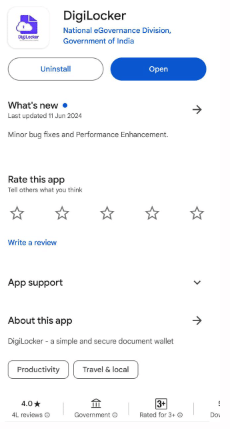
Step 2: Log in to the DigiLocker App using your details from CBSE or sign up if you are a first-time user. Your registered mobile number can be used as your username.
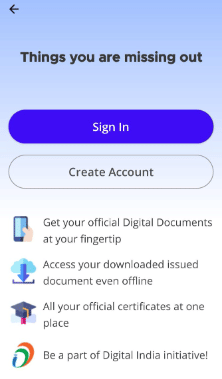
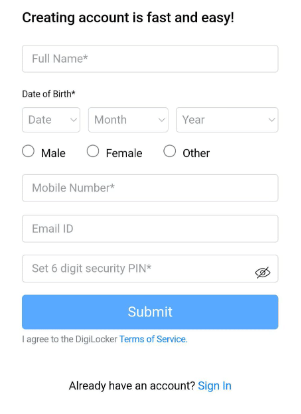
Your account password will be your mother’s first name in lowercase followed by the last four digits of your roll number. If you are a first-time user, you need to create an account by providing your Full Name, Date of Birth, Gender, Mobile Number, Email ID and setting up a 6-digit security pin.
However, if you already have an account on Digilocker, you must login using your registered Mobile Number.
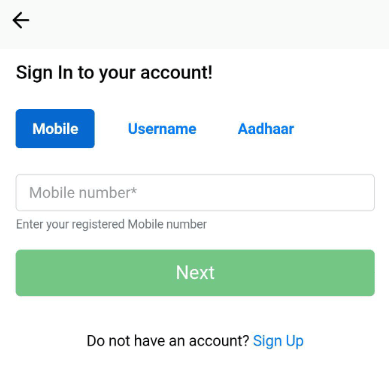
Next, you are required to enter your Username and the 6-digit security pin.
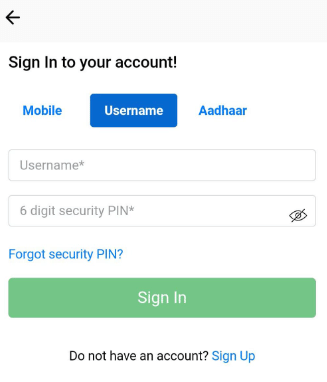
Step 3: You can also log in by confirming or verifying your Aadhaar card number to get your documents if you have not received any SMS from the CBSE. The page provided below will be displayed on your computer screen or the mobile page.
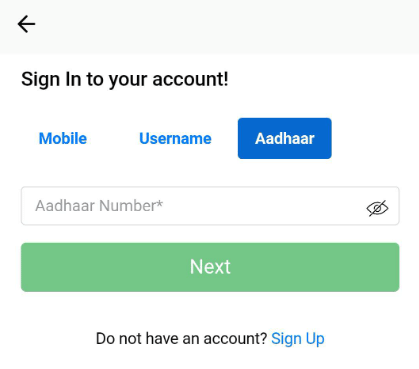
Step 4: After completing the registration process, enter your Aadhar Card details in the DigiLocker application to prove that your profile is authentic. You also need to enter an OTP which will be sent to you.
Step 5: After this, you must enter your OTP and check in for the first time using your registered mobile number and other details.
Step 6: After logging in successfully, navigate through the homepage and click on the 'Issued Documents' section. Under this section, all the documents available for download like the CTET marksheet, certificate or other documents can be found.
Step 7: In the 'Issued Documents' section, search for 'Central Board of Secondary Education (CBSE)' and click on it. You will then be directed to a page where you can find your CTET-related documents.
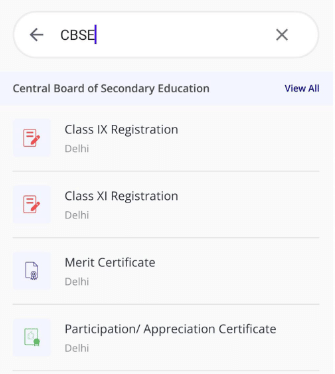
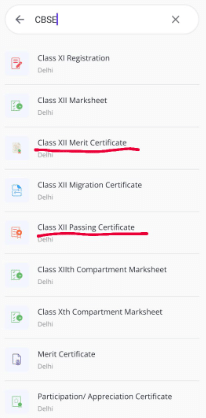
Step 8: After clicking proceeding further, two options will be provided for CBSE 2026, i.e. “Teacher Eligibility Test Certificate” & “Teacher Eligibility Test Mark Sheet”.
Step 9: Click on the “Teacher Eligibility Test Certificate” link to download the CTET Eligibility Certificate and click on “Teacher Eligibility Test Mark Sheet” for the CTET Mark Sheet.
Step 10: After selecting the relevant link, enter your CTET Roll Number and select the year of passing the document.
Step 11: Click on the “Get Document” button to view and download your CTET “Teacher Eligibility Test Certificate” or “Teacher Eligibility Test Mark Sheet”.
Step 12: When prompted, enter your 6-digit security PIN to authenticate and proceed with the download.
Step 13: Download the CTET Certificate and keep it safe for future reference.
Direct Link to Download CTET 2026 Certificate and Marksheet
In order to download the CTET 2026 certificate and marksheet, candidates can visit the official website ctet.nic.in or access it directly through the DigiLocker app. The direct download link will be activated once CBSE officially declares the CTET 2026 result.
CTET Marksheet & Certificate on DigiLocker: Important Points
The most important points pertaining to the DigiLocker CTET certificate 2026 have been provided below:
- CBSE is responsible for providing CTET marksheets to all the appeared candidates and eligibility certificates to all qualified candidates in digital format via their DigiLocker account.
- According to the IT Act, the CTET marksheets and certificates are digitally signed and legally valid. Since the Digilocker is a government initiative under the Ministry of Electronics and Information Technology (MeitY), CTET certificates downloaded from the app are considered valid and authentic.
- In order to improve security, an encrypted QR Code will be provided on the CTET certificates and marksheets. Candidates will be able to verify and scan this QR code using the DigiLocker mobile app.
- Every candidate appearing for the CTET exam has a DigiLocker account created for them, and they receive their account credentials on their registered mobile numbers.
- Candidates will be able to download their digital marksheets and certificates using the credentials provided to them.
What to Do if There is a DigiLocker Login Issue?
If a situation arises that a candidate is unable to log in to the DigiLocker app, he must first visit the DigiLocker Support page. Next, it is imperative for him to follow the guidelines mentioned in this article and provide his/her email ID at the provided link. Now that he has been redirected to a new page, he will have to provide his login credentials, including your name and mobile number. He is also required to provide other credentials including sub-categories and then select his specific issue from the drop-down section.
On the other hand, if a candidate wishes to send an email to support@digitallocker.gov.in, he must provide his registered mobile number and CTET Roll Number in the email. Candidates who have not received their login details from the CBSE or have lost access to their registered mobile number can still retrieve their certificates from DigiLocker by logging in with his Aadhar Card Number.
Details Mentioned in the CTET Certificate and Marksheet 2026
The CTET certificate and marksheet 2026 will comprise the information provided below:
- Name of the candidate
- Roll number of the candidate
- Category of the candidate
- Mother's name
- Father's name/Husband name
- Marks obtained in each subject
- Marks obtained in total
- Total marks
- Result status
- Date of result declaration
- Other important instructions
CTET 2026 Certificate Validity
The validity of the CTET certificate has been extended to a lifetime for candidates from all categories. The CTET eligibility certificate will remain valid for a lifetime from the date when it is issued by the Central Board of Secondary Education (CBSE). The qualifying marks for the CTET exam are 60% (90 out of 150) for General category candidates and 55% (82 out of 150) for reserved category candidates including OBC, SC, ST, and PwD. The CTET certificate will be issued only to those candidates who obtain the minimum CTET cutoff 2026. Additionally, a candidate is allowed to appear for the CTET exam as many times he deems fit and there is no restriction on the number of attempts. Even if a candidate has acquired the Digilocker CTET certificate 2026, he/she has the privilege to appear for the exam again to improve his/her CTET scores.
Related Links
The greatest advantage of downloading your CTET certificate from Digilocker is that the app allows you to access your CTET certificate anytime, anywhere, that is safely stored and easily accessible. Individuals who qualify the CTET exam become eligible for teacher recruitment in the schools affiliated under the Central Government- KVS, NVS, Central Tibetan Schools, etc. and schools owned by state governments and local bodies.
For further doubts regarding the CTET Exam 2026 can ask their queries on Collegedekho QnA Zone . For more updates regarding CTET certificate and marksheet, stay tuned to CollegeDekho!
FAQs
You should download your CTET certificate from the DigiLocker app because DigiLocker is a secure cloud-based platform designed by the government that allows the storage, sharing, and validation of certificates and documents. With the help of the app, CTET exam qualifiers can easily access and share their CTET certificates in electronic format.
You can download the CTET 2024 certificate by logging into the Digilocker app or website. Select the ‘Get More Now/Get Issued Documents’ option after logging into Digilocker. Do not forget to enter your CTET Roll Number and select the year of passing the document.
Yes, both CTET 2024 certificates and mark sheets available on the DigiLocker app. You must login to the app using your registered Mobile Number to download your certificate and marksheet.
Yes, the Aadhar Number is mandatory for downloading the CTET marksheet since it acts as an authentication medium for CBSE. You can also log in to the DigiLocker app by confirming or verifying your Aadhaar card number to download your documents if you have not received any SMS from the CBSE.
The CTET 2024 certificate for the July session will be available on DigiLocker shortly after the declaration of the CTET 2024 result, likely by the last week of August 2024.












Similar Articles
Indian Navy Posts for Class 10 and Class 12 Students: Eligibility Criteria, Application Process and Selection Process
CBSE Class 12 Re-Evaluation 2026 (Application Opens May 19): Fees Slashed, OSM Backlash & Refund Policy
AP Inter Supplementary Exams 2026: Dates (Out), Application Fee, Hall Ticket, Results
Can I do B.Arch after 12th Arts/Commerce?
Stream-Wise Expected CUET UG 2026 Cutoffs for Top DU Colleges
Top Central Universities with Low CUET Cutoffs for 2026 Admissions