- We’re on your favourite socials!



Search for best colleges, Courses, Exams and Education updates
Updated By Aarushi Jain on 15 Dec, 2025 14:14

The SNAP 2025 admit card for Test 3 can be downloaded on December 15, 2025, from the official website. Only a coloured printout of the specific test’s admit card will be accepted at the exam centre for identity verification. Make sure to download the correct admit card from the official SNAP website on the release date.
Predict your Percentile based on your SNAP performance
Predict RankThe SNAP 2025 admit card for the third session can be downloaded from the official website @snaptest.org starting December 15, 2025. The admit cards for the second session were released on December 8, 2025. The admit card for the first session was released on November 28, 2025. The SNAP 2025 will be held in three sessions on December 6, 14, and 20, 2025. Registered candidates will be able to download the SNAP admit card 2025 using their SNAP ID and Password. The direct link to download the SNAP 2025 admit card has been provided below:
The SNAP 2025 admit card needs to be kept handy on the exam day to be allowed to attempt the exam. Please note that you will not receive a physical copy of your SNAP admit card in the mail, nor will a duplicate be issued if you lose your admit card. Candidates must be cautious until the SIU admission process (GE/PI/WAT) is completed because only candidates with valid admit cards will be allowed to take the test. Find complete information about the SNAP admit card 2025 on this page.
The SNAP Admit Card 2025 dates have been released officially on the website. Candidates can download their SNAP admit card per the schedule below.
Events | Dates |
|---|---|
SNAP 2025 Admit Card Release Date |
|
SNAP 2025 Exam Dates |
|
In order to access your admit card, you should follow the steps given below:
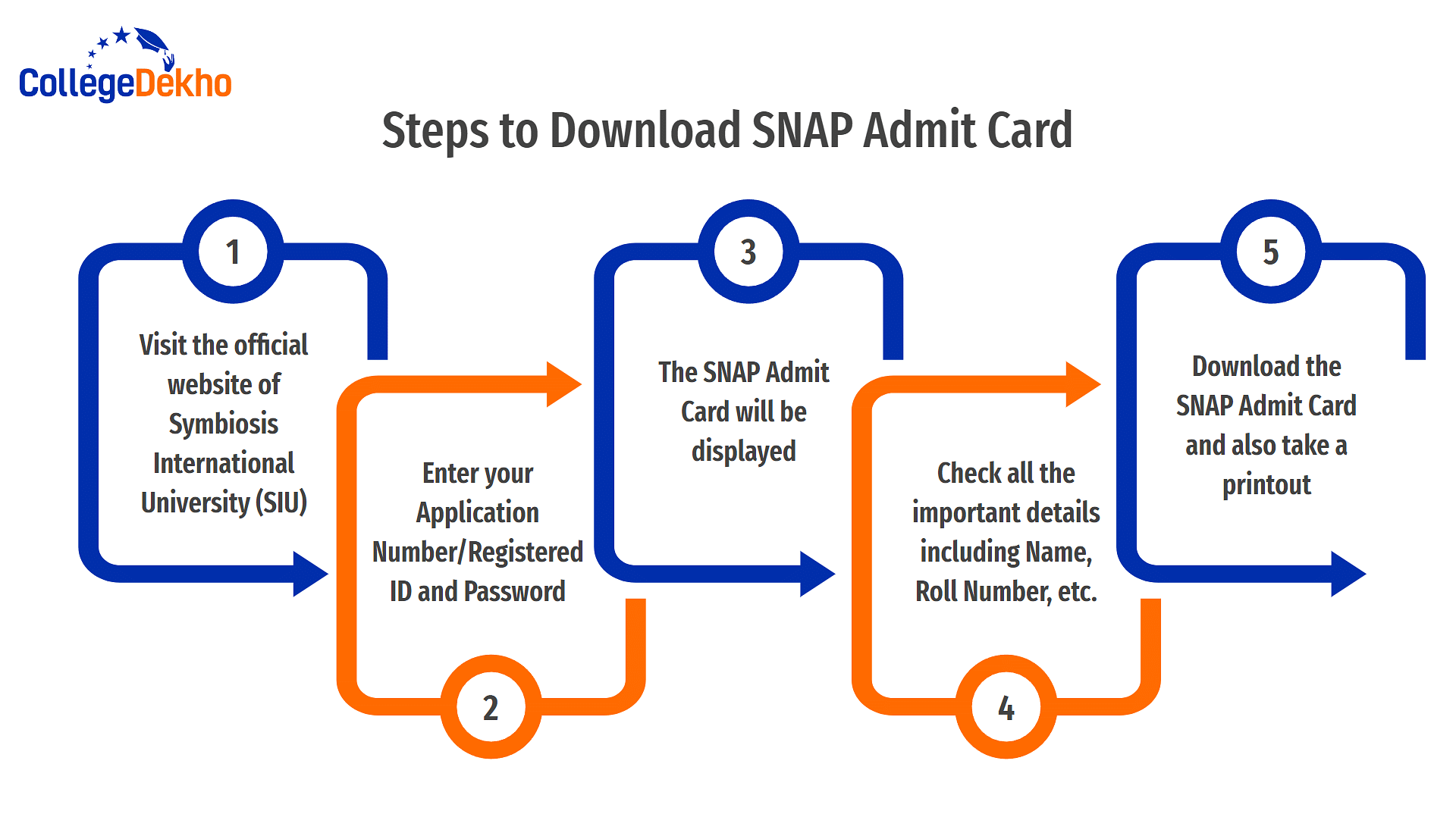
When you try to download your SNAP Admit Card for 2025, you might face some common issues. Here are the key points to keep in mind:
The SNAP Admit Card 2025 will contain the following details of the candidates:
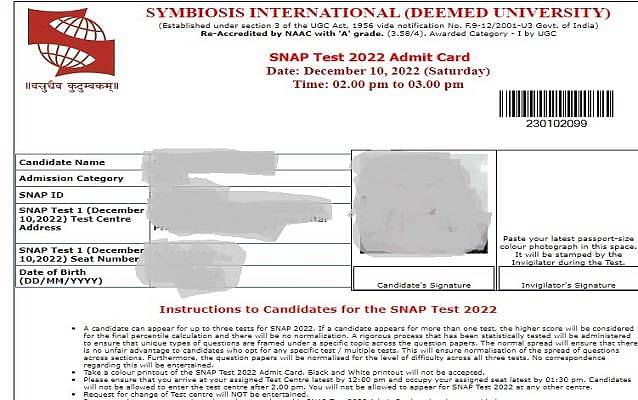
In order to verify a candidate's identity at the exam centres, conducting authority has mandated that candidates carry the following ID documents required along with the SNAP admit card to the examination centre.
Given below are some of the important instructions that a candidate must keep in mind regarding the SNAP Admit Card 2025.
Given below are some of the requirements that a candidate must keep in mind while downloading the SNAP admit card.
Before appearing for SNAP 2025, candidates should carefully check and verify that all the information on their SNAP 2025 admit card is correct. If there are any errors or discrepancies, they should get in touch with the help desk to get them rectified before the date of the exam. Here is the information you should verify:
However, candidates must note that no separate window will be provided for the correction of the SNAP admit card 2025. If any incorrect details are found, candidates must contact:
Symbiosis Test Secretariat,
Symbiosis International Deemed University, Pune -412115
E-mail: info@snaptest.org
In case, a candidate forgets their password required to login to access their SNAP admit card, the following steps must be followed to reset the password and regain access to your SNAP account.
Visit the SNAP official website - snaptest.org
A popup window will open prompting the candidate to enter their Applicant Name, Date of Birth and E-mail ID.
After entering all the required details, click on the “Submit” button.
The password will be sent to your registered email ID on SNAP 2024.
To help you stay organised, here’s a detailed list of what you should and shouldn’t do on the exam day, along with practical tips to manage time, documents, and exam centre formalities.
Do’s on the SNAP Exam Day | Don’ts on the SNAP Exam Day |
|---|---|
Print your SNAP 2025 admit card using a colour laser printer on A4-sized paper. Ensure your photograph is clear and visible. | Do not bring any electronic gadgets such as smartwatches, calculators, mobile phones, or digital wristbands inside the exam centre. |
Reach the test centre at least 90 minutes before the reporting time to complete biometric verification and registration comfortably. | Do not carry any bags, notes, or study materials. These items are strictly prohibited inside the exam hall. |
Confirm that your name, photograph, and signature are correctly printed on both your admit card and valid photo ID. Carry original ID proof like Aadhaar Card, Passport, or Driving License. | Avoid trying to use unfair means or any form of malpractice. Attempting to cheat can lead to immediate disqualification. |
Keep your admit card, photo ID, and a ballpoint pen with you. Only these items are allowed inside the hall. | Don’t panic if any question seems difficult. Skip it initially and return later if time allows. |
Write your name and seat number on each rough sheet provided before beginning the rough work. | Do not waste too much time on a single question or section. Move on if you are uncertain. |
Listen carefully to the invigilator’s announcements before and during the test. Follow all instructions given inside the exam hall. | Avoid rushing through the paper. Read each question carefully to understand what is being asked. |
Manage your time efficiently by dividing it based on the three exam sections — General English, Quantitative, Data Interpretation, and Analytical & Logical Reasoning. | No candidate is allowed to leave the exam hall before the test concludes. Leaving early may result in the cancellation of your attempt. |
Attempt all questions as there is no negative marking in SNAP 2025. This increases your overall attempt count and boosts your percentile chances. | Avoid carrying damaged or unclear ID proof; such documents may lead to entry denial. |
Cross-check your system number displayed outside the lab and match it with the one mentioned against your name before entering. | Don’t forget to submit all rough sheets to the invigilator before leaving the hall. |
If you complete the paper early, use the remaining time to review your responses and correct any missed or wrongly marked answers. | Avoid creating any disturbance inside the examination room. Maintain discipline throughout the test. |
Want to know more about SNAP
Unfortunately, there is no provision for changing the exam center once the SNAP admit card 2025 has been issued. Candidates are required to take the test at the exam centre specified on the SNAP admit card 2024. To prevent inconvenience, it's crucial to carefully select test cities in the SNAP application form, with the home city or current city as the first preference.
Candidates can obtain the SNAP 2025 admit card by either visiting the official website or clicking on the provided link in this article for download.
The SNAP 2025 admit card will be available online on the SNAP Test website. The admit card is vital, featuring important details such as exam time, duration, venue, name, and roll number. Caution is advised until the SIU admission process (GE/PI/WAT) is complete, as only candidates with valid admit cards will be permitted to take the test.
It is advisable to save your SNAP admit card until the completion of the entire admission process. This includes the exam, result declaration, shortlisting for further rounds, and final admission. Keeping the admit card safe ensures that you have the necessary details and documentation throughout the entire admission procedure.
On the official login page to download the SNAP admit card, you should click on 'Forget Password'. Then, enter all of the required details and submit to receive your password for SNAP.
In case any of your details are incorrectly mentioned on the SNAP admit card, you should immediately inform SIU via mail or phone. Any discrepancy in your SNAP admit card needs to be corrected before you can sit for the exam.
Yes. You should bring a valid ID proof to the exam centre along with the admit card. The documents you can bring along with the SNAP admit card are Passport, PAN Card, Voter ID, DL, Aadhar etc.
When you receive your SNAP admit card, make sure to check important details such as your name, photograph, signature, registration number, exam date, reporting time, exam center address, and instructions. Ensure that all the information is accurate and contact the authorities immediately if you notice any discrepancies.
You will not be allowed to enter into the exam centre without a valid admit card for SNAP. The exam conducting authorities will verify your details on the admit card before allowing you inside the exam centre.
No, there is no fee to download the SNAP admit card. The admit card is typically available for download on the official website of SNAP, and candidates can access it free of charge by logging into their registered accounts using the provided credentials.
SIU does not send a physical copy of the SNAP admit card to any candidate. You will have to download the SNAP admit card from the official website and take a printout to bring to the exam centre.
To download the SNAP admit card for the year 2025, visit snaptest.org. On the home page, log in by entering your SNAP User ID and Password, then click on the 'Login' tab. Once logged in, the SNAP 2025 admit card will be displayed on your screen. Proceed to download the admit card and ensure to take a printout. It is essential to keep the admit card secure for future reference and use.
To download the SNAP admit card, you typically need to visit the official website of the SNAP exam conducting body and log in using your registered credentials. The admit card is usually available for download in the candidate's dashboard. Ensure you have your login ID and password ready to access and download the admit card.
Typical response between 24-48 hours
Get personalized response
Free of Cost
Access to community